
Content localization
Add languages to your content, choose a fallback when a translation is missing, and translate the admin interface.
Ridu can store a different value for each language in fields such as a post’s title and body. Other fields, such as a slug or product code, can stay the same across all languages.
A locale identifies a language or regional variation, such as en, fr, or en-GB. You
choose which locales your application supports and which fields need translations.
Content language and admin interface language are separate settings. An editor can write French content while using English menus and buttons. Start with content languages below, or skip to the admin interface language.
Configuration
| Option or method | What it controls |
|---|---|
Localization.Locales |
Declares the allowed content locales and their author-facing labels. |
Localization.DefaultLocale |
Selects the locale used when a request does not specify one. |
Localization.DisableFallback |
Requires exact values by default instead of following each locale’s fallback chain. |
Localization.AvailableLocales |
Dynamically reduces the locale choices shown to one admin actor; it does not weaken API authorization. |
Locale.FallbackLocales |
Lists ordered fallback locales for one selected locale. |
Locale.RTL |
Marks content in that locale as right-to-left in the admin. |
field.Localized() |
Stores a separate value or container for each configured locale. |
Request locale / fallbackLocale |
Overrides the read locale and fallback behavior for one API operation. |
Request locale: 'all' |
Returns locale-keyed values and makes ordinary mutations read-only. |
Add content languages
Add your languages to Localization.Locales and choose a default. Here French and Arabic use
English text when a translation is missing:
func Config() ridu.Config {
  return ridu.Config{
    Name: "Editorial",
    Localization: ridu.LocalizationConfig{
      DefaultLocale: "en",
      Locales: []ridu.Locale{
        {Code: "en", Label: "English"},
        {
        Code:            "fr",
        Label:           "Français",
        FallbackLocales: []schema.LocaleCode{"en"},
      },
        {
          Code:            "ar",
          Label:           "العربية",
          RTL:             true,
          FallbackLocales: []schema.LocaleCode{"en"},
        },
      },
    },
    Collections: []ridu.Collection{Posts},
  }
}
Choose a unique, case-sensitive code for each locale. The default and every FallbackLocales
entry must refer to a configured locale. Fallbacks cannot refer to themselves or form a loop, and
codes such as all, *, false, none, and null are reserved for API requests.
Fallback is enabled by default: a read can use another language’s text when the selected language
has no value. Set DisableFallback: true on Localization to turn this off by default.
Individual requests can still choose their own fallback languages.
Choose which fields need translations
Add .Localized() to each field that needs a separate value per language. This works for text,
relationships, uploads, groups, arrays, blocks, and other fields that store content:
var Posts = ridu.Collection{
  Slug: "posts",
  Fields: field.Fields{
    field.Text("slug").Required().Unique(),
    field.Text("title").Required().Localized(),
    field.Group("seo", field.Fields{
      field.Text("title").Localized(),
      field.Text("canonicalURL"),
    }),
    field.Relationship("editor", "users").Localized(),
  },
}
Adding .Localized() to a group, array, or blocks field gives each language its own copy of the
whole group or list. To translate only selected children, leave the parent shared and add
.Localized() to those child fields instead.
A required translated field needs a value only for the language you are saving. You do not have
to submit every translation at once. .Unique() also checks uniqueness within each language. When
a migration makes a translated field required, it follows the
same rule: missing translations are allowed, but an empty translation, or no translation in any
language, stops the migration.
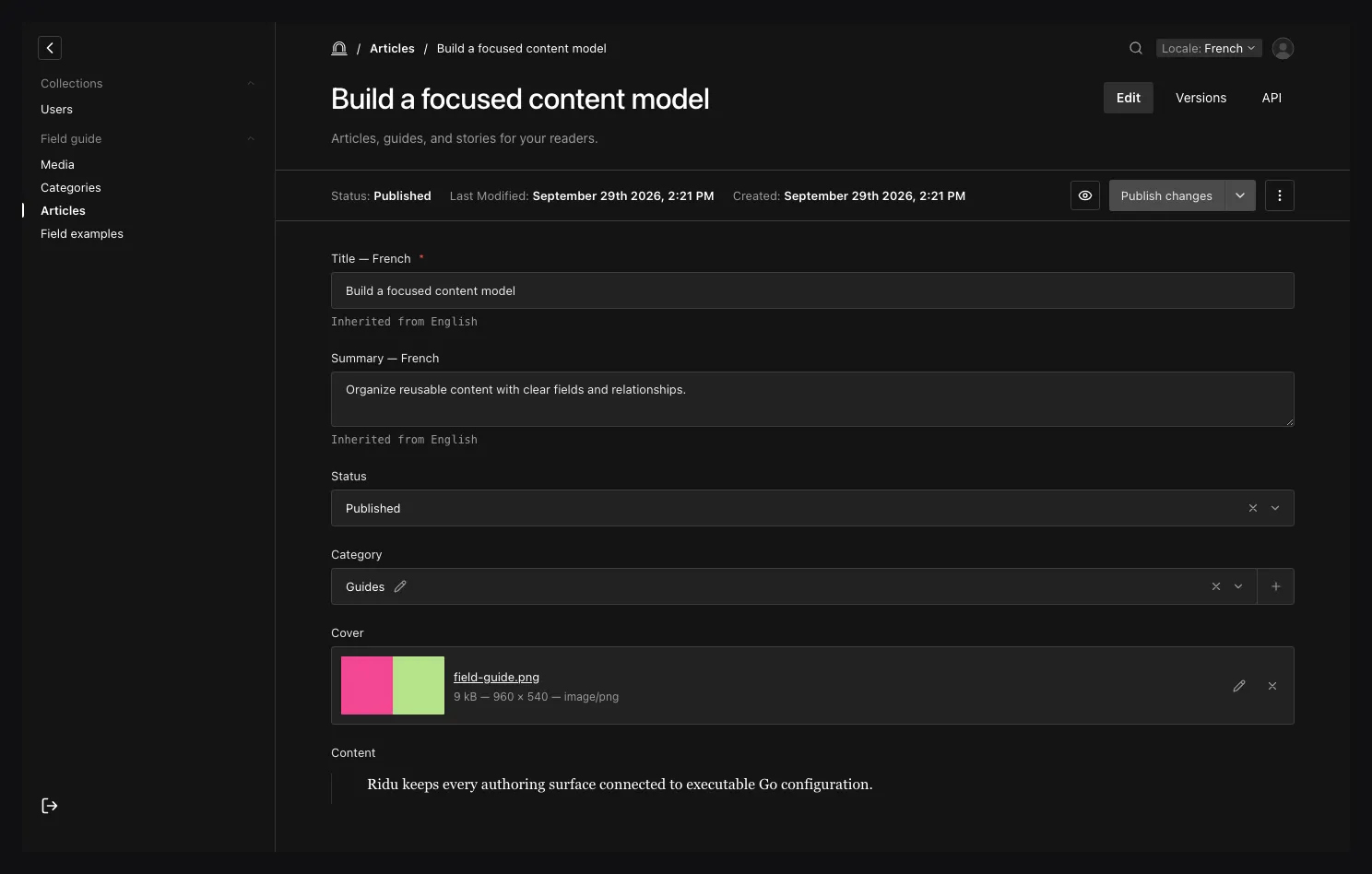
The interface remains English while the content locale is French. “Inherited from English” shows the fallback source before an author writes a French value.
Read content in one language
Pass locale to read a particular language; omit it to use your configured default. Choose
fallback languages with fallbackLocale, or set it to false to return only values saved in the
requested language:
const french = await client.find('posts', 'post_123', {
  locale: 'fr',
  fallbackLocale: ['en']
});

const exactFrench = await client.find('posts', 'post_123', {
  locale: 'fr',
  fallbackLocale: false
});
REST uses locale=fr and fallback-locale=en (or the camel-case fallbackLocale alias). The local
Go API uses ridu.LocaleOptions or the locale fields on list/find/mutation options.
Fallback still respects access rules: it cannot reveal an unreadable document or field. The REST
response includes _localization.sources, which maps field paths to the language each value
came from. An empty string is returned as-is when fallback is off; with fallback on, Ridu treats
it as missing and tries the next language.
Use translations in validation, hooks, and access rules
When you save French content, a localized field’s validator or write hook receives the French
value and ctx.Locale is "fr". ctx.Prior.String("title") reads the previously saved French
title. If only an English title exists, there is no previous French value: displaying English as
fallback does not save it as a French translation.
Inside an array or block, Prior follows the same row even if the editor reorders it.
Read hooks and read access rules can receive fallback text. ctx.Locale still identifies the
requested language, so do not use it to guess which language supplied that text. On an
all-languages read, Ridu calls the rule for each translated value with its own locale and
AllLocales == false. A shared field may receive language-keyed values in ctx.Root with
AllLocales == true.
A field callback’s ctx.Local.FindByID lookup reads the same language without fallback. It also
keeps the current user’s access rules and shares the current transaction. See
Using other field values for examples.
Read every translation
Use locale: 'all' in the SDK, locale=all (or *) in REST, or AllLocales: true in Go to
receive every translation. Translated fields become objects keyed by language; shared fields
keep their usual values:
{
  "id": "post_123",
  "slug": "hello-ridu",
  "title": {
    "en": "Hello, Ridu",
    "fr": "Bonjour, Ridu",
    "ar": "مرحباً Ridu"
  }
}
Ridu checks field access for every translation, including values in populated related documents.
Create and update requests cannot use all; save one language at a time.
The generated TypeScript client infers language maps when you pass locale: 'all'. If your
locale variable could be either 'all' or a single language, check which response shape you
have before reading its fields.
Save one translation
Saving French content updates the French fields and leaves other translations in place. Shared fields still update for every language:
await client.update(
  'posts',
  'post_123',
  { title: 'Bonjour, Ridu' },
  { locale: 'fr', revision: 7 }
);
Versions keep translations too, so restoring an older version can restore its translated content.
Copy a translation to another language
Use copyLocale to copy saved values from one language to another:
await client.copyLocale(
  'posts',
  'post_123',
  { from: 'en', to: 'fr' },
  { revision: 7 }
);
Ridu checks that the user can read the source and write the destination, validates the copied
values, and checks the document revision before saving. The local API exposes CopyLocale; REST uses
POST /api/collections/{collection}/{id}/copy-locale. Globals have matching local, REST, and SDK
operations.
Choose which languages an author sees
Use AvailableLocales to shorten the admin’s language list for a particular signed-in user. This
Go callback receives the user, their auth collection, request context, and local API.
This changes the language selector only. Use field and collection access rules to restrict which
translations someone can read or write through the API. The callback must return at least one
configured locale, with no duplicates; otherwise Ridu returns locale_availability_failed.
Translate the admin interface
Ridu includes English, French, and Arabic interface translations in @riducms/translations.
Choose the available languages and timezones in your Go config, then pass the matching translation
catalogs to mountAdmin in your admin entry file:
Admin: ridu.AdminConfig{
  User: "users",
  Localization: ridu.AdminLocalizationConfig{
    Languages: []ridu.AdminLanguage{
      {Code: "en", Label: "English"},
      {Code: "fr", Label: "Français"},
      {Code: "ar", Label: "العربية", RTL: true},
    },
    DefaultLanguage: "en",
    TimeZones: []ridu.AdminTimeZone{
      {ID: "UTC", Label: "UTC"},
      {ID: "Europe/Paris", Label: "Paris"},
    },
    DefaultTimeZone: "UTC",
  },
},
Install the direct admin dependency if the project does not already declare it:
npm install --workspace admin @riducms/translationsbun add --cwd admin @riducms/translationspnpm --dir admin add @riducms/translationsyarn --cwd admin add @riducms/translationsimport { createAdminClient, mountAdmin } from '@riducms/admin';
import { ar, en, fr } from '@riducms/translations';
import { adminPlugins } from '@/plugins';
mountAdmin({
target: document.getElementById('app')!,
clientFactory: createAdminClient,
plugins: adminPlugins,
languages: [en, fr, ar]
});Each language code in Go needs a matching catalog in languages, with the same right-to-left
setting. The admin reports an error if a catalog is missing or these settings disagree. Use
defineTranslationLanguage to supply your own catalog, or extendTranslationLanguage to adapt
an existing one. Admin plugins can supply their own translated messages.
You can also translate your application’s field labels, choices, block names, tabs, collection and
global labels, app name, and timezone labels using their *Translations settings. Ridu uses the
original label when no translation is provided.
Authors choose their interface language and timezone in account settings. Ridu remembers the choice and formats dates, times, numbers, and plural messages accordingly.
What authors see in the admin
The admin remembers the selected content language and labels values inherited from a fallback language. It keeps unsaved edits when the author switches languages and asks before saving inherited content as a translation. Arabic and other RTL locales use right-to-left editing, including in rich text.
Draft and published status apply to the whole document. You cannot publish one translation while keeping another in draft. Changing the interface language does not translate your content, and changing the content language does not change your interface language or timezone.
See Querying data for locale-aware filters and population, Access control
for locale context in rules, and the core reference for exact Go fields.