
Group field
Store related fields together in a nested object, such as an address or SEO settings.
Use field.Group for one object with a known shape: SEO metadata, an address, dimensions, or a
reusable set of settings. Generated Go and TypeScript types include the nested fields.
In the admin
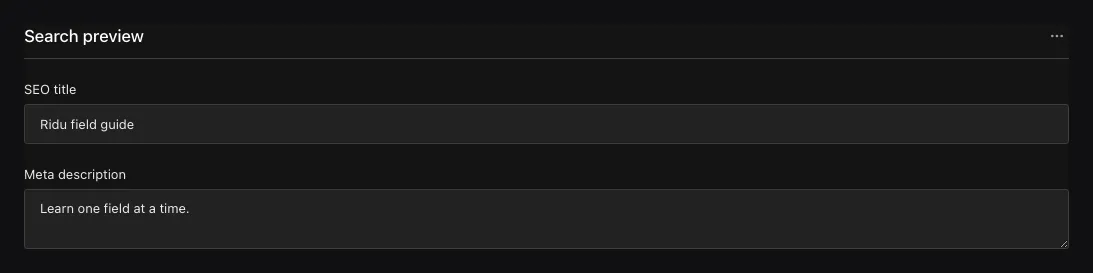
Grouped controls become one nested object, with child paths such as seo.title.
Group related fields
field.Group("seo", field.Fields{
  field.Text("title").MaxLength(60),
  field.Textarea("description").MaxLength(160),
}){
"seo": {
"title": "A concise search title",
"description": "A concise search description."
}
}At least one child field is required. Child names must be unique within the group and produce
paths such as seo.title and seo.description.
Configuration
| Constructor or method | What it controls |
|---|---|
field.Group(name, fields) |
Creates one stored object with the supplied child fields. |
.Required() |
Requires the group object; child requiredness remains separate. |
.Localized() |
Stores a separate object for each content locale; localized children can also opt in individually. |
.Validate(...) / .LiveValidate(...) |
Validates the complete object; child validators still run. |
.EditChildren(...) |
Applies a checked immutable edit to the group’s direct child graph. |
.Admin(...) |
Sets label, description, width, visibility, and collapsed presentation. |
.Access(...), .Hooks(...), .AfterRead(...) |
Controls the group as a subtree during authorization and lifecycle phases. |
Customize a reusable group
Define a function that returns a group, then use field.EditChild to change one child where the
group is used. Here, CompactLink limits the label length without repeating the Link definition:
func Link(name string) field.GroupField {
  return field.Group(name, field.Fields{
    field.Text("label").Required(),
    field.Text("href").Required(),
  })
}

func CompactLink(name string) (field.GroupField, error) {
  return field.EditChild(Link(name), "label", field.AsText,
    func(label field.TextField) field.TextField {
      return label.MaxLength(32).EditAdmin(func(admin *field.Admin) {
        admin.Description = "Keep navigation labels short"
      })
    })
}
field.AsText checks that label is a Text field before calling your function. Use
field.AsCheckbox, field.AsRelationship, or the matching converter for another field type.
The edit keeps existing settings and changes only the values you set.
| Helper | What it does |
|---|---|
field.EditChild(parent, name, field.AsText, edit) |
Change a child field or its admin settings. |
field.ReplaceChild(parent, name, replacement) |
Replace a child and all its settings. |
field.AppendChild(parent, child) |
Add a child after the existing fields. |
These functions also work on arrays. They return an updated field and leave the original
definition unchanged. An unknown child name, wrong field type, or invalid edit returns an error.
Use the child’s direct name, such as label; dotted paths are not accepted. ReplaceChild
replaces the entire field, including its validation and access rules.
Use EditChildren with field.ChildrenDraft when you need to change several children together
or rename a child and update references to it.
Query and translate nested fields
Group supports Required, Localized, conditions, and common presentation options. Each child
keeps its own validation, access rules, hooks, and admin settings. Query nested children with
a dotted path such as seo.title; the generated SDK accepts these paths in where. The group
container also supports an exists filter.
Localize individual children when only those values vary. Put Localized on the Group when the
entire object varies by locale. A localized container falls back as a container instead
of mixing child values from different locale objects.
Common mistakes
- Use Array when there can be several objects and Blocks when rows have different shapes.
- A Group changes the API path. Use Row or Collapsible to organise controls without adding an object wrapper.
- Renaming the group or a child is a stored-data and API migration.
See field.Group and field.Fields.