
Blocks field
Build pages from different content sections, such as heroes, quotes, and image galleries.
Use field.Blocks when authors need to combine different kinds of content in one list. A page
can contain a hero, a quote, and an image gallery in any order. Each block stores a blockType
value that identifies its type, followed by that type’s fields.
In the admin
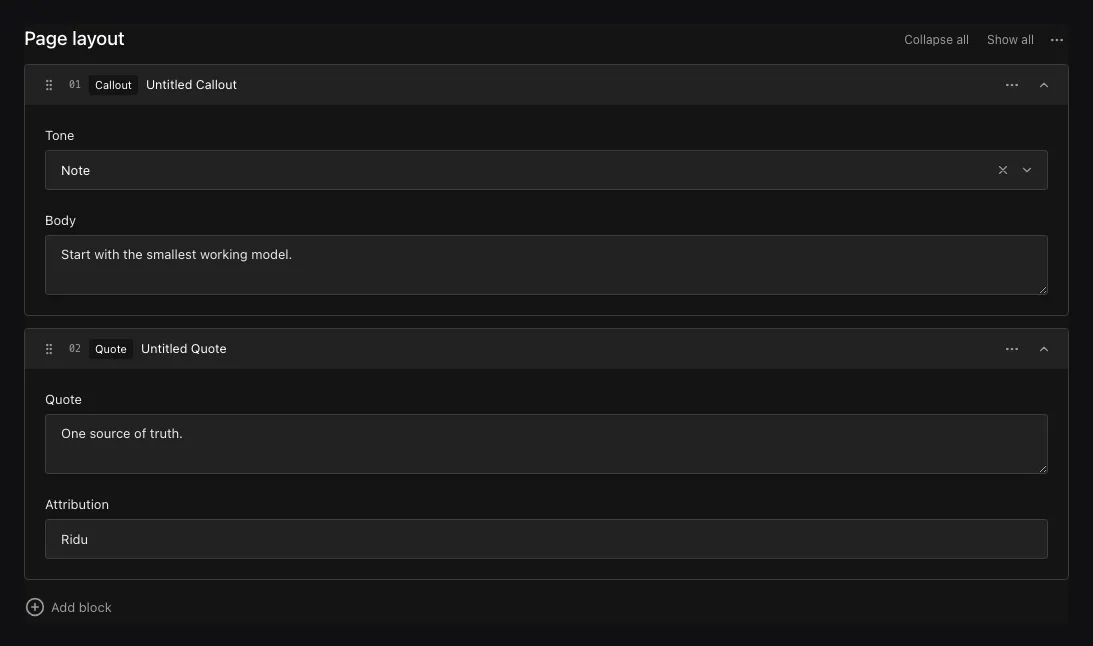
Authors choose a block type, fill in its fields, and drag blocks into order.
Add blocks to a page
field.Blocks("layout",
  field.Block{
    Slug:  "hero",
    Admin: field.BlockAdmin{RowLabelPath: "heading"},
    Fields: field.Fields{
      field.Text("heading").Required(),
      field.Textarea("summary"),
    },
  },
  field.Block{
    Slug: "quote",
    Fields: field.Fields{
      field.Textarea("text").Required(),
      field.Text("source"),
    },
  },
).MinRows(1).MaxRows(20){
"layout": [
{ "blockType": "hero", "heading": "Build with Ridu" },
{ "blockType": "quote", "text": "Content is structured data." }
]
}At least one block type is required. Slugs must be unique lowercase kebab-case. A direct block child
cannot be named blockType because Ridu uses it to identify the block.
Configuration
| Constructor or method | What it controls |
|---|---|
field.Blocks(name, blocks...) |
Creates an ordered list from block definitions owned by this field. |
field.Block{Slug, Labels, Admin, Fields} |
Defines a case’s stable slug, author-facing labels, row presentation, and child fields. |
.References(slugs...) |
Selects registered Config.Blocks definitions and their picker order. |
.MinRows(n) / .MaxRows(n) |
Sets inclusive bounds for the complete block list. |
.Required() |
Requires a present, non-empty list. |
.Localized() |
Stores separate list membership, order, keys, and values for each content locale. |
.Validate(...) / .LiveValidate(...) |
Validates the whole list; each selected block’s child rules also run. |
.EditBlocks(...) |
Applies a checked immutable edit to inline block definitions. |
.Access(...), .Hooks(...), .AfterRead(...) |
Controls the list as a subtree during authorization and lifecycle phases. |
Label blocks and limit the list
Ridu generates singular and plural block names from the slug: hero becomes “Hero” / “Heroes”,
people becomes “Person” / “People”, and hero-banner becomes “Hero Banner” / “Hero Banners”.
The picker, row heading fallback and rich-text insert menu use the singular name. Omit labels
unless you want different wording or capitalization:
field.Block{
  Slug: "promotion",
  Labels: field.BlockLabels{
    Singular:             "CTA",
    Plural:               "CTAs",
    SingularTranslations: map[string]string{"fr": "Appel à l’action"},
    PluralTranslations:   map[string]string{"fr": "Appels à l’action"},
  },
  Fields: field.Fields{field.Text("heading")},
}
Each omitted form is generated independently from the slug. Defaults use English inflection; translations use the admin language and do not affect content localization. The same defaults and overrides apply to blocks declared inline, registered definitions and rich text. Labels belong to the block definition and are shared by every place it is used. Block-type labels are separate from list/container labels and from a row heading derived from its values.
Authors can add any configured block type, edit its fields, and reorder the list. Set
BlockAdmin.RowLabelPath to a direct scalar child to provide a content summary for
row actions and drag labels when the editorial name is empty. For example, a Hero
block can use its heading value in these labels. This does not replace the header
name input or its “Untitled” placeholder. JSON, Point, and MultiSelect fields
cannot serve as row labels.
Set Admin.RowLabel to a custom row label component when
you need richer supplementary header content.
Give each block an editorial name
Every block has an editable name in its header, including rich-text cards and
their editing drawers. Ridu adds an optional plain field.Text("blockName") with
an empty-string default when you omit it from Fields. Declare it yourself to
customize the ordinary Text field:
field.Block{
  Slug: "cta",
  Admin: field.BlockAdmin{RowLabelPath: "heading"},
  Fields: field.Fields{
    field.Text("blockName").Label("Internal name"),
    field.Text("heading").Required(),
  },
}
The header uses the same field access and visibility guards as the content form;
it does not repeat blockName in the body. When empty, the input shows “Untitled”
as a placeholder. It does not use a content summary as the placeholder, and the
placeholder is never saved. Custom row-label components remain supplementary
header content.
An explicit blockName must be a direct plain Text field with its standard editor,
not a slug or custom editor. You can customize its default, validation, access,
visibility and localization through the normal field configuration. The name is
optional and nonlocalized in this example; add .Required() or .Localized()
only when the application needs it.
The API and generated types include blockName like any other child: directly on
ordinary blocks and inside fields on rich-text blocks. Names persist through
ordinary saves, revisions and localization. Renaming does not change _key,
blockType, public headings or URL anchors. Duplication retains the name and
creates fresh keys.
MinRows and MaxRows constrain a supplied list. An optional field may remain absent or null,
but a supplied empty list must satisfy MinRows. Required additionally requires a nonempty
list. Omit MaxRows for no configured maximum; an explicit maximum must be positive. The admin applies the same limits to adding,
duplicating, pasting and deleting rows.
Keep block keys when updating
Ridu assigns a _key to each new block and nested array row when saving. Keep the key when
editing or reordering an existing row so Ridu can recognize it. Keys must be nonblank strings
and unique within their list. Invalid keys produce a validation error at that row’s _key path.
Changing a row’s blockType requires a new key. Duplicating or pasting blocks generates new
keys for the copied blocks and nested rows.
When updating a row with an existing key, omit children that should stay unchanged. This also
preserves fields hidden by access rules. Send null to clear a value, or remove the row from
the list to delete it. All changes still pass through validation and access checks. New rows
receive defaults and must supply their required fields.
For translated children, an omitted value stays unchanged in the selected locale. Ridu does
not copy a fallback translation into storage. Explicit values, including null and empty
strings, are still validated.
In the admin, reordering preserves unsaved edits and each row’s field permissions. Collapsed blocks indicate errors inside them; click an error to reveal the field that needs attention.
Change block definitions
If you reduce row limits, check and migrate documents that exceed the new limits. Changing a row heading does not change stored data.
Before removing a block type, migrate documents that use it. If stored content refers to a removed type, Ridu preserves that content but returns a recovery conflict when it cannot safely read or update the document. Restore the block definition or migrate the affected document; the admin cannot edit it until the conflict is resolved.
Query and translate blocks
Query paths include the block type, for example layout.quote.source. Use exists to check
for the list itself.
Add .Localized() to a child for translated values in a shared layout. Add it to the Blocks
field when each locale needs its own list of blocks and ordering.
Name reusable block types
Set TypeName on a block when you want a predictable name in the generated Go
and TypeScript types:
var Hero = field.Block{
  Slug:     "hero",
  TypeName: "Hero",
  Fields: field.Fields{
    field.Text("heading").Required(),
    field.Text("summary"),
  },
}

layout := field.Blocks("layout", Hero).Required()
TypeName: "Hero" names the generated types; the stored blockType remains hero. You
can reuse this definition across fields and collections. Blocks sharing a generated name must
have the same fields and settings, although labels and translations may differ. Without an
explicit name, Ridu derives one from the collection and field path. Conflicting names produce
a configuration error.
Register shared definitions
Use an explicit registry when several fields should share one fixed definition:
hero := field.Block{
  Slug:     "hero",
  TypeName: "Hero",
  Fields:   field.Fields{field.Text("heading").Required()},
}
config := ridu.Config{Blocks: []field.Block{hero}}
layout := field.Blocks("layout").References("hero").MaxRows(12)
body := richtext.Field("body", richtext.Config{BlockReferences: []string{"hero"}})
Reference order sets picker order. Each field uses either inline blocks or references. Duplicate registrations, repeated or missing references, mixed declarations and reference cycles are errors. Definitions can reference other registered definitions, including inside rich text. Registration order does not matter.
Declaring a block inline and registering it produce the same block. A slug names one block for the
whole application, so every declaration of a slug must be identical: reuse one field.Block value
wherever it appears, and give a different block its own slug. Ridu reports a conflicting
declaration with both locations. Callbacks are identical only when they come from the same value,
so a block whose fields have hooks, validators or access rules should be built once and reused, or
registered. References selects only blocks registered in Config.Blocks.
Edit the central definition to change it everywhere. Resource-local field edits may inspect its children but cannot modify them. Register a different slug for a customized variant. Requiredness, row limits, localization and container access remain settings of each referencing field.
Each block appears once in the generated schema and /api/schema, however many fields and other
blocks use it. Without an explicit TypeName, its generated name derives from the slug:
hero-banner becomes HeroBanner. Type names must be unique, so set TypeName when a slug’s name
collides with another generated name. The stored blockType, row _key and field persistence
identities are the same whether a block is declared inline or registered.
Access callbacks still receive the current document, row, actor and locale. Ridu evaluates them for each occurrence, and the admin uses the same document-aware capabilities everywhere a block is used. Sharing a definition does not cache an access decision across documents or rows.
Large layout builders whose blocks nest other blocks are cheap: Ridu checks, stores and generates each block once, however many paths through the graph place it. Placement paths may nest fields at most 48 levels and stay within 64 path segments. Fields with hooks, validators, access rules, dynamic defaults or visibility conditions are bound once with their block too. A request runs them only for the values the document holds, so a hook on a widely shared block adds no cost for the many places the block could appear.
Field capabilities, such as those the admin reads, list each value of such a field and each place
in the document that holds values. Everywhere else, for example a block row the editor has yet to
add, one entry per block field applies: blockFields maps the block’s slug and the field’s path
within the block to it. Its access rule runs without row siblings there.
Use blocks in TypeScript
Generated TypeScript includes Hero, HeroInput, and a union such as PagesLayoutBlock for
the complete list. Check blockType to get the fields for a particular block.
_key is optional when creating a block and always present when reading it. Use it as the key
in Svelte loops. Other output fields may be omitted by access rules or field selection.
Create blocks in Go
Generated Go includes a struct for each block type and a list type for the field:
rows := generated.PagesLayoutInput{
  &generated.HeroInput{Heading: "Hello"},
}
// Use core.NonNull(rows) for a required layout
// in the generated create input.
HeroInput writes blockType: "hero" automatically. The generated HeroBlockType constant is
available when you need that string in a query.
When reading, use a Go type switch on *generated.Hero to handle each block type. Unlike
TypeScript, Go does not warn if the switch misses one of the supported types.
Invalid block data returns *generated.ContractError. Its Operation, Container, and Path
identify the failure, for example PagesLayoutInput[0].links[1].label. Use errors.As to
inspect an underlying JSON error.
Update existing blocks in Go
Start with the read layout’s Retain() method. It creates an update list containing each
existing block’s key, in the same order. Change only the fields you want to update:
patch, err := page.Layout.Retain()
if err != nil {
  return err
}
heading := "Updated heading"
for _, row := range patch {
  if hero, ok := row.(*generated.HeroUpdate); ok {
    hero.Heading = &heading
  }
}
// Supply core.SetNonNull(patch) as Layout
// in a revision-checked PageUpdate.
Retain() does not copy child values into the update, so unrelated fields stay unchanged,
including fields hidden by access rules. The returned list uses HeroUpdate and the other
generated update types. They require a key and let you omit unchanged children.
Append &generated.HeroInput{...} to add a block. Remove an entry to delete a block, or reorder
entries to move them. New rows must supply required fields even when you provide a key yourself.
Save with a revision check to avoid overwriting another author’s changes.
Block lists contain pointers. Call BlockKey() to read a row’s key without a type switch.
Retain() returns an error for an absent layout, nil row, empty key, or duplicate key; an
explicitly empty layout returns an empty update list.
Update an array inside a block
Arrays inside blocks follow the same pattern. For a Content block with a links array,
read links, present := content.Links.Get(), check presence, then call links.Retain().
The returned ContentLinksUpdate contains *ContentLinksRowUpdate values with only their keys.
Change the desired row and assign the list to the retained Content update with core.Set(linksPatch).
Untouched rows and redacted fields survive the edit. Append &ContentLinksRowInput{...} to add a row,
or explicitly remove/reorder entries. Nil lists and missing or duplicate keys fail; an explicit
empty array retains an empty list. Save the containing document with a revision check.
New and retained array update rows expose RowKey() for finding, removing or reordering
entries without first asserting their concrete type. It returns the supplied identity,
or an empty string for a nil or unkeyed row. Concrete array read rows expose the same accessor.
Work with choices and optional values
Select and radio children generate named string types and constants for completion in Go.
For a Hero tone select with light and dark choices, use core.Set(generated.HeroToneDark).
The engine still validates allowed values; named Go string types are not closed enums.
Nullable block output children use *generated.BlockOptional[T]: a nil outer pointer means
omitted, a nil Value means explicit null, and Get() returns a concrete value when present.
Required output children use pointers because reads can redact them.
| Task | Use |
|---|---|
| Add a block | HeroInput inside PagesLayoutInput (or a PagesLayoutUpdate when editing). |
| Render a block | Switch on *Hero; check required-field pointers and call Get() on nullable fields. |
| Edit a retained block | Call Retain(), then edit *HeroUpdate. |
| Supply an optional mutation value | core.Set(value); use core.Null[T]() for explicit null. |
| Supply a required list | core.NonNull(rows) on create; core.SetNonNull(patch) on update. |
Mutation wrappers expose Get() to inspect a concrete value with the same (value, ok)
pattern as nullable reads. A nullable wrapper reports false for omission or null; a non-null
wrapper reports false only when omitted.
A nil pointer omits the field from an update. For a field represented by *T, pass a pointer
to send a concrete value, including empty strings, zero and false. Keep display defaults in
your renderer; avoid copying defaulted read values into updates.
Read and list documents with blocks in Go
The generated collection supports reads and writes:
PagesCollection supports Create, Update, and populated Find and List reads, while
PagesCollectionAllLocales selects all locales automatically for both operations.
The all-locales collection is generated when localization is configured.
Use core.TypedListOptions for filtering, sorting, pagination, population and projection:
assetPath, err := query.ParsePath("layout.media.asset")
if err != nil {
  return err
}
result, err := generated.PagesCollection.With(app.Local()).List(ctx,
  core.TypedListOptions{
    Limit:    20,
    Populate: []query.Population{{Path: assetPath, Depth: 1}},
  })
For a layout with a Media block and asset relationship, result.Documents contains typed
pages with populated assets. Access rules apply before pagination; decode failures return
an error with no partial page. Use PagesCollectionAllLocales.With(app.Local()).List
when exporting translations. Populated references expose an ID and an optional typed document.
AllLocalesValue types describe values beneath a localized container: their children are
already locale-specific, but populated targets may still contain locale maps.
The repository’s examples/blocks application shows pages built from Hero, Content, Media,
and CTA blocks, including reused blocks, related assets, and blocks inside rich text. It
includes creation and rendering examples in Go, TypeScript, and Svelte. For file uploads, see
Uploads.
Common mistakes
- The block type’s
Keyis stored asblockType. Renaming or removing a type requires migrating existing data and updating code that reads those blocks. - Use Array when every row has the same shape; it keeps the list simpler.
- Blocks store structured content. Handle every generated union member in the frontend.
See field.Blocks, field.Block, and
Generated contracts.