
Array field
Create a repeatable list of fields, such as navigation links or product variants.
Use field.Array for a repeatable list whose rows all have the same fields: navigation links,
credits, opening hours, or product variants.
For primitive strings or numbers without child fields, use TextList or NumberList.
In the admin
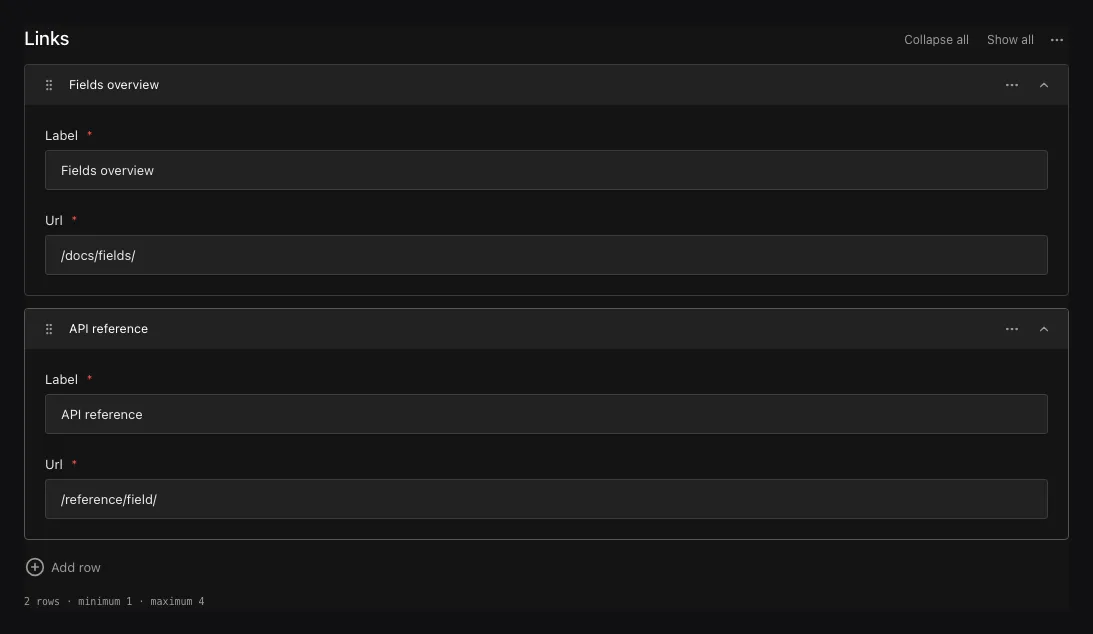
Authors can add links and drag them into the order they should appear.
Add a list of links
field.Array("links", field.Fields{
  field.Text("label").Required(),
  field.Text("url").Required(),
}).MinRows(1).MaxRows(12).Admin(field.Admin{RowLabelPath: "label"}){
"links": [{ "label": "Documentation", "url": "/docs/" }]
}At least one child definition is required. MinRows may be zero, MaxRows must be at least one,
and the minimum cannot exceed the maximum. Admin.RowLabelPath chooses a child field to use as each row’s heading.
Configuration
| Constructor or method | What it controls |
|---|---|
field.Array(name, fields) |
Creates an ordered list of objects with the supplied child fields. |
.MinRows(n) / .MaxRows(n) |
Sets inclusive bounds for the complete list. |
.Required() |
Requires a present, non-empty list. |
.Localized() |
Stores separate list membership, order, keys, and localized children for each locale. |
.Admin(field.Admin{RowLabelPath: ...}) |
Uses one child value as the row heading; RowLabel can select a custom component. |
.Validate(...) / .LiveValidate(...) |
Validates the whole list; child validators still run for each row. |
.EditChildren(...) |
Applies a checked immutable edit to the direct child field graph. |
.Access(...), .Hooks(...), .AfterRead(...) |
Controls container access, write lifecycle, and returned list. |
Edit and label rows
Authors can add, reorder, duplicate, and remove rows within the limits you set. Use
Admin.RowLabels to change labels such as “Add link” and Admin.RowLabelPath to show each link’s
label in its heading. For richer headings, set Admin.RowLabel to a
custom row label component and keep RowLabelPath as the
plain-text fallback.
Query and validate rows
Validation errors identify the row and child field, for example links.2.url. Query children with
paths such as links.label, or use exists to check for the array itself. The generated Go and
TypeScript types preserve the order of the list.
Keep row keys when updating
Ridu assigns each new row a stable _key when you omit it, including rows created through the API.
Keep the returned key when editing or reordering that row so localized values and editor bindings
stay attached to it. Keys must be nonempty strings and unique within their list. Duplicating a
document assigns fresh row keys.
Translate rows
Add .Localized() to a child when the same rows need translated values. Add it to the Array
when each locale needs a separate list or a different order. A localized array falls back to
one locale’s complete list.
Common mistakes
- Use Blocks for a list of different row types.
- Row order is data. Reordering can be meaningful even when every child value stays the same.
Admin.RowLabelPathmust name a direct stored child, not a nested path or layout field.- An array can grow request and document size quickly; set a realistic
MaxRows.
See field.Array, field.ArrayField.MinRows, and
field.Admin.RowLabelPath.