
Date field
Add a date picker for a calendar date, time, or date and time together.
Use field.Date for a calendar date, a time of day, or a date and time together. The API accepts
and returns a string in the format you choose.
In the admin
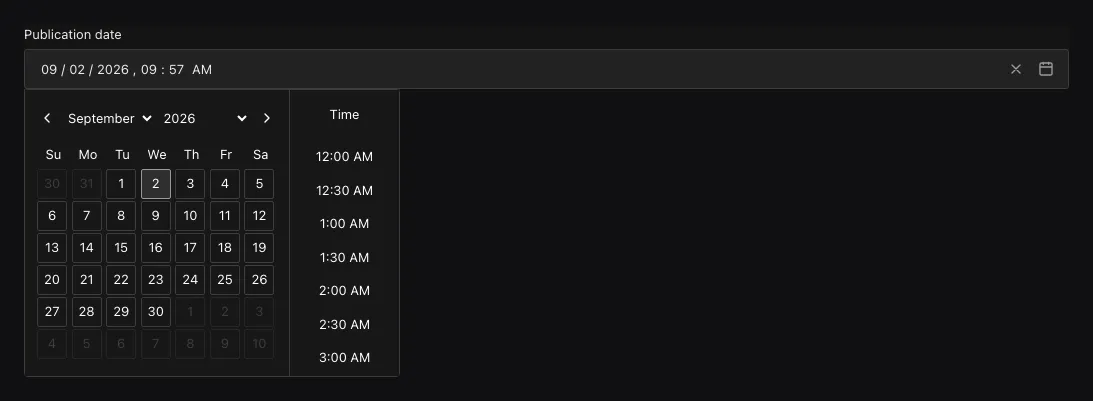
A DateTime field stores an RFC 3339 timestamp; the admin selects the matching date-and-time control.
Choose a date or time format
field.Date("startsAt").
  Required().
Format(field.DateTime)| Format | Accepted value | Use it for |
|---|---|---|
DateOnly |
YYYY-MM-DD |
Birthdays, release days, and other calendar dates |
DateTime |
RFC 3339 timestamp | An instant such as 2027-06-10T09:30:00Z |
TimeOnly |
HH:mm or HH:mm:ss |
A local opening time without a date |
Ridu stores a DateTime value in one form, UTC with milliseconds, whichever RFC 3339 form was
sent: 2027-06-10T11:30:00+02:00 is stored as 2027-06-10T09:30:00.000Z. Reads return that
form.
The field format controls server validation, OpenAPI, and the matching admin control. Omitting
Format uses field.DateOnly. Changing its Admin settings does not change the accepted format.
Configuration
| Constructor or method | What it controls |
|---|---|
field.Date(name) |
Creates a stored date string. |
.Format(field.DateOnly) / .Format(field.DateTime) |
Accepts a calendar date or an RFC 3339 timestamp. |
.Required() |
Rejects a missing, null, or empty date. |
.Default(value) / .DefaultFrom(callback) |
Supplies a fixed or request-aware initial date string. |
.Index() / .Unique() |
Adds an index for filtering/sorting or enforces distinct values. |
.Localized() |
Stores a separate date value for each configured content locale. |
.Validate(callback) / .LiveValidate(callback) |
Adds domain-specific save or live checks. |
Defaults, timezones, and sorting
Use .Default(...) for a fixed date string or .DefaultFrom(callback) to calculate an initial
date when saving, such as the current time. A Date callback returns operation.Value[string]
matching the field’s Format. For a DateTime field, .Default(time.Now().Format(time.RFC3339))
fixes the timestamp when your configuration is built. Calculate it inside .DefaultFrom(...)
when it should change with each new document. See Set default field values.
Date also supports Required, localization, uniqueness/indexing, and common admin options.
Filters and sorts compare the stored strings. Because every DateTime value is stored as UTC with
milliseconds, string order is time order, and query.DateTime matches a value however it was
written. Use RFC 3339 with an explicit offset for day-and-time values; convert for display in the
consumer rather than removing timezone information before storage.
A localized date is appropriate only when the underlying content really differs by locale. A single event instant usually should not be localized merely because each audience formats it differently.
Common mistakes
- Do not send a JavaScript
Dateobject directly. Serialize a day/time string matching the chosen format. - A day-only value has no timezone. Do not convert it through midnight UTC and accidentally move it to another day.
- Time-only values need an application-owned timezone and recurrence model if they represent store hours or schedules.
See field.Date,
DateField.Format, and querying.